
Evaluations
The Evaluations page is the control of the reviews customers leave for products. Here you see what they wrote, decide which ones will be displayed in the store and protect their personal details. The customer is asked to review after their order, from the email the store sends. You can also send these emails in bulk from the page.
The list
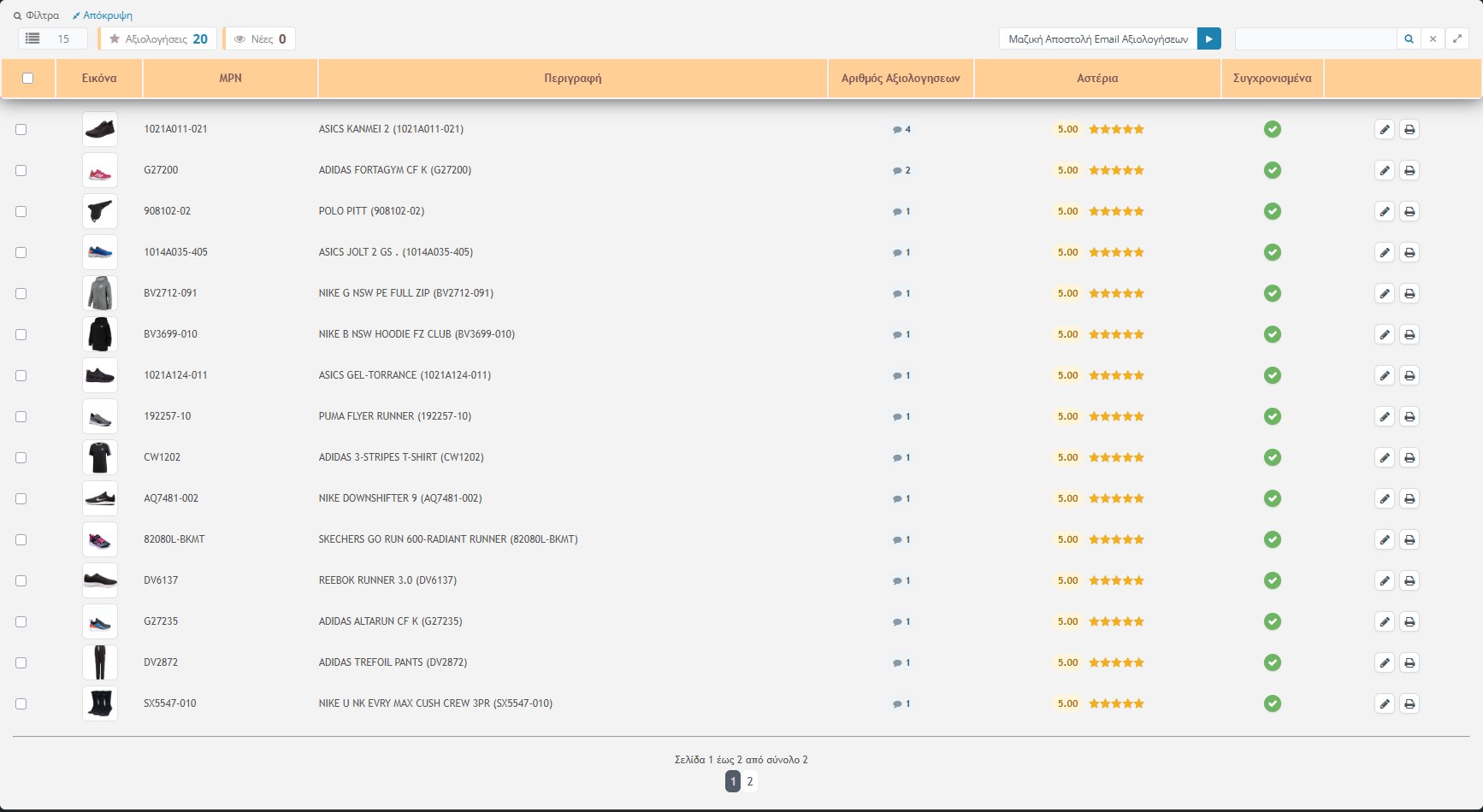
Each row is a product with its reviews (not a single review). The columns are:
- Image, MPN and Description: the product. If a product has since been deleted, the row shows it in red (“the code no longer exists”).
- Number of reviews: how many reviews the product has.
- Stars: the average rating (up to 5), with the stars drawn.
- Synced: the green ✔ means the changes have been saved and passed to the store. The little eye means the row is new and you haven’t checked it yet.
- Actions: Edit (pencil), Print and Delete (bin).
At the top
- Rows per page and two cards: how many reviews there are in total and how many are new. When there are new ones, the card becomes a link that shows only those. In new rows the MPN, the description and the number appear in red.
- Search: by MPN, description, manufacturer, sync status (#0 unsynced, #1 synced) or number of stars (e.g. “>3” or “<4”).
- Bulk sending of review emails: the button with the arrow, see below.
- Multiple delete: from the selection checkbox in the header.
Editing a review
By clicking the row (or the pencil) a window opens with all the product’s reviews.
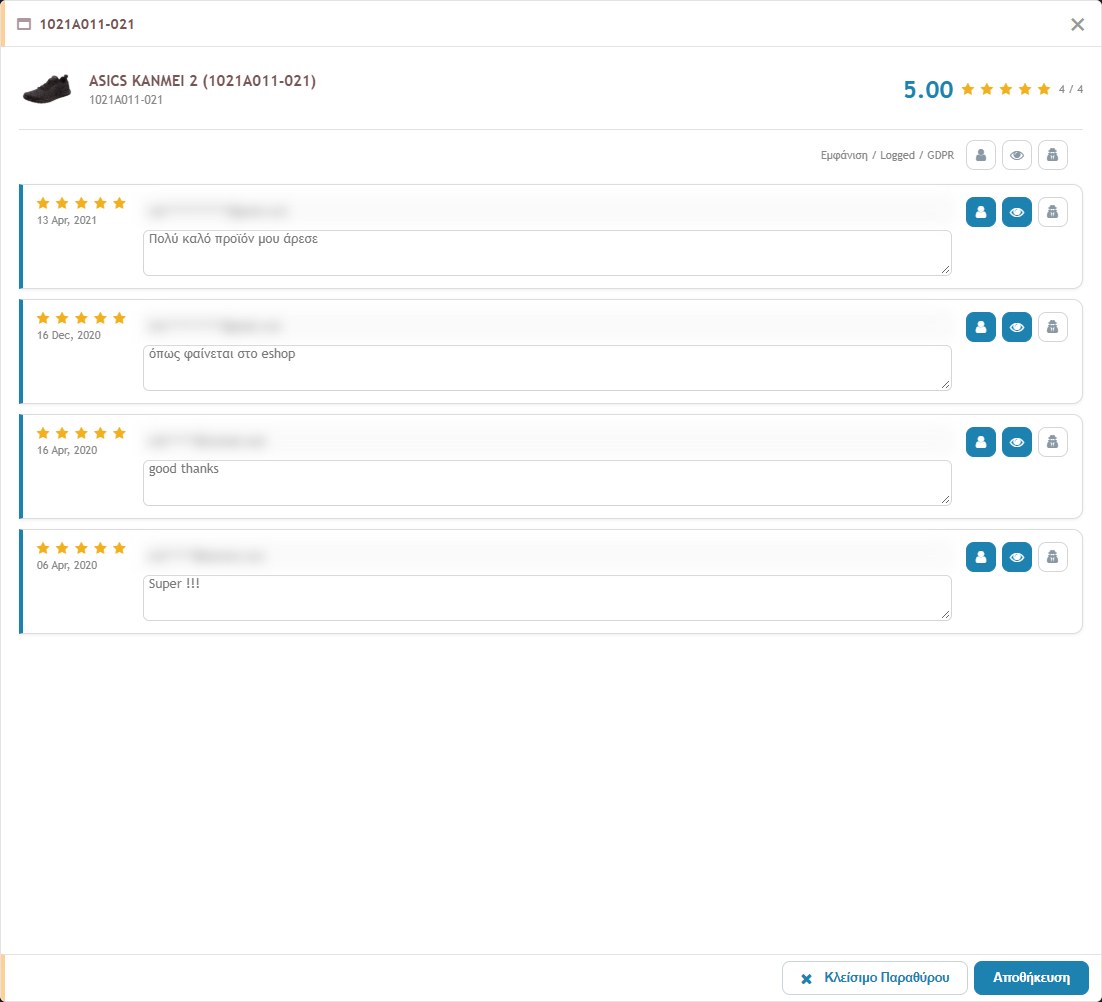
At the top you see the photo, the title, the MPN and the average rating, together with the count “Visible / Total” (e.g. 4 / 4 means all four reviews are displayed). Each review has:
- Stars and date: the rating and when it was given.
- Email: of the review, in a field you can change.
- Text: in a box you can correct (e.g. spelling).
- Logged (little person): marks that the customer was logged in when they wrote the review.
- Display (little eye): the switch that decides whether the review is shown in the store. A review that is not displayed is dimmed in the list and doesn’t count in the average.
- GDPR (little person with a mask): replaces the email with a hidden form, so that the customer’s address is not visible, and makes it visible and “logged”.
The Display / Logged / GDPR row above the reviews has the same three buttons for all the reviews together.
At the bottom of the window, Close window closes it without saving and Save saves the changes. Saving recalculates the average from the reviews that are displayed and “syncs” the product, so that the change passes to the store.
Before you save: if you have changed text or email, the change cannot be undone. The “|” characters and line breaks inside the texts are replaced automatically, because otherwise they would break the reviews file.
The print button (printer icon) shows the reviews of a product in a form suitable for printing: title, average rating and the reviews as text, without buttons.
Bulk sending of review emails
The Bulk Sending of Review Emails button starts sending the emails that invite customers to review their purchases. The store sends them one by one, with a short delay between them, and the progress page refreshes by itself. According to the code:
- It sends to orders placed 15 to 30 days ago (the limits are adjustable).
- The order must have a shipping voucher and an email address, and not be in a status that excludes sending.
- In each run up to 50 emails are sent (also adjustable). When the limit is reached, a link to continue appears. The store remembers how far it got and does not send again to the same people.
- If an order does not meet the conditions, the progress page states the reason (e.g. no voucher or no email) and moves on to the next.
- The language of the email follows the language of the order (Greek or English). The text of the email is defined in the Email Templates, in the type “Ratings Dispatch Notification”.
Caution: the button really sends emails to customers. Press it only when you want them to go out and leave the window open until it finishes.